In this article
This article shows how to assemble a two-stage compound planetary gear set in Engrenarium. The example uses a complete planetary gear train in the first stage and a second stage without sun gear, connected to the first by couplings between carriers and between planet gears.
First stage
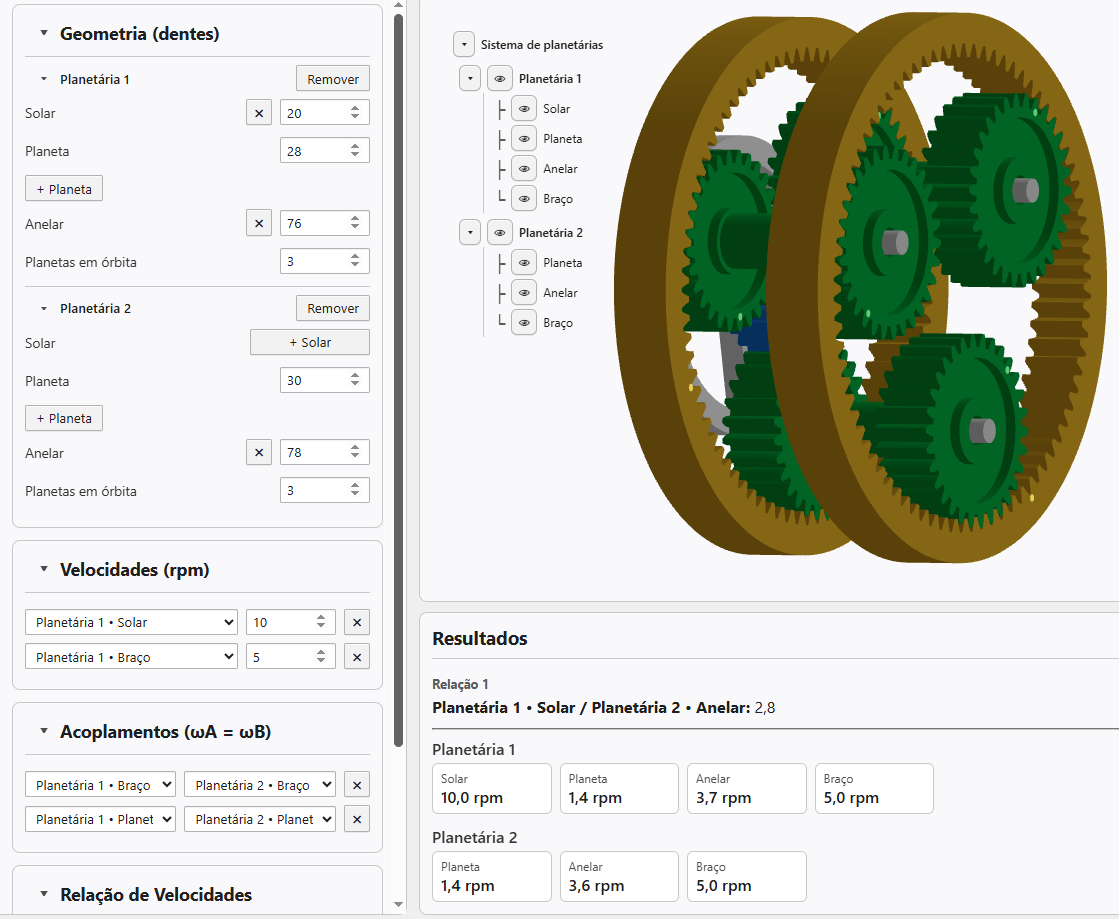
Open a new project in Engrenarium. In the basic parameters panel, configure the first planetary with the following tooth counts:
| Planetary 1 | Tooth count |
|---|---|
| Sun gear | 20 |
| Planet | 28 |
| Ring | 76 |
Then click add planetary gear set. Engrenarium stops the simulation and reports that the kinematic system is underdetermined. This is to be expected: when creating a second stage, it still lacks known speeds or sufficient couplings to define the motion.
Second stage without sun gear
In planetary 2, delete sun gear and configure only the planet and the ring gear:
| Planetary 2 | Tooth count |
|---|---|
| Planet | 30 |
| Ring | 78 |
This detail is important: a planetary stage does not need to contain all possible parts to participate in the mechanism. In this example, the second planetary works without sun gear and receives movement through the couplings.
Speeds and couplings
Now impose the known angular velocities on planetary 1:
| Element | Angular velocity |
|---|---|
| Planetary 1 - Sun gear | \(10.0\ \mathrm{rpm}\) |
| Planetary 1 - Carrier | \(5.0\ \mathrm{rpm}\) |
Then, in couplings, connect the corresponding elements between the two stages:
- Planetary 1 - Carrier with Planetary 2 - Carrier;
- Planetary 1 - Planet with Planetary 2 - Planet.
In relation to speeds, select Planetary 1 - Sun gear as input and Planetary 2 - Ring as an output.
First stage equations
In planetary 1, the relationship between sun gear, ring gear and carrier can be written by the speeds relative to carrier:
It follows:
The speed of the first stage planet comes from the contact relationship with sun gear:
Second stage equations
The two couplings transfer speeds to the second stage:
As planetary 2 does not have sun gear, the speed of the ring gear can be obtained by the relationship between planet, ring gear and carrier:
With input at the sun gear of planetary gear set 1 and exit at the ring of planetary 2, the relationship indicated by Engrenarium is:
Expected results
The results panel should show the relationship Planetary 1 - Sun gear / Planetary 2 - Ring equal to approximately \(2.8\).
| Element | Angular velocity |
|---|---|
| Planetary 1 - Sun gear | \(10.0\ \mathrm{rpm}\) |
| Planetary 1 - Planet | \(1.4\ \mathrm{rpm}\) |
| Planetary 1 - Ring | \(3.7\ \mathrm{rpm}\) |
| Planetary 1 - Carrier | \(5.0\ \mathrm{rpm}\) |
| Planetary 2 - Planet | \(1.4\ \mathrm{rpm}\) |
| Planetary 2 - Ring | \(3.6\ \mathrm{rpm}\) |
| Planetary 2 - Carrier | \(5.0\ \mathrm{rpm}\) |
Why are both couplings needed
Coupling just the carriers is not enough. Physically, the carriers of the two stages could rotate together while the planets of each stage would rotate at different speeds. Therefore, the coupling between planet gears is also essential to transform the two stages into a compound planetary gear set with determined movement.
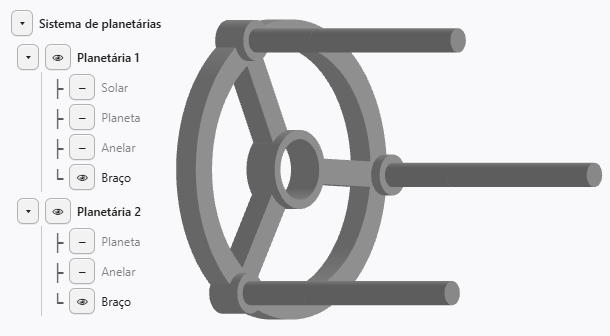
This behavior also explains why the rendering of the second carrier disappears. The model now represents a common carrier, adjusted to support the planets of both stages and maintain the correct kinematic constraints.
Questions about an equation or result? Send this page address and your calculation inputs to arturavelar@ufsj.edu.br. · About the author · Privacy